

Key Takeaways
You can use Emerald Chat on your phone when you are out or on your computer when you are relaxing at home.
If you have a Gold membership, there is a special app you can download to make things even easier.
Starting a conversation is very simple. You just follow the easy steps on our main page.
We use a special age check to make sure everyone stays safe and happy.
You can use video or group chats to meet people who like the same hobbies as you.
- Jumping into online chat rooms can sometimes feel random. You might get lucky with a great conversation, or you might waste time on chats that don’t go anywhere.
Sometimes, starting a chat with someone new can feel a little bit like a surprise. You might meet a wonderful new friend, or you might feel like the conversation is not quite right. At Emerald Chat, we want every talk you have to be a good one. We made our site work well on both phones and computers so you can choose the one that makes you feel most comfortable. We want you to stay safe while you make genuine connections with others.
In this guide, we will talk about how Emerald Chat works. We will show you the differences between using your phone or the website so you can have the best time possible.
How Emerald Chat Works
Emerald Chat is a friendly place where you can talk to people without having to share your name right away. We care deeply about your safety. Many people say we are a lot like the new Omegle, but we work hard to make our chats much more helpful and kind. You can choose to type messages or use your camera to talk to new friends from all over the world.
Our site makes it so easy to find people who enjoy the same things you do. You can talk about music you love or fun hobbies. If you are looking for an app to make friends around the world, this is a lovely place to start. Every chat is private, so you can feel free to be yourself.
Mobile vs Website Experience
You can access Emerald Chat from both mobile and desktop, depending on your preference.
- On Mobile (Free Access): Emerald Chat can be accessed via any web browser. It’s quick, simple, and perfect for spontaneous chats.
- On Mobile (Emerald Gold Access): If you’re an Emerald Gold member, you can use our downloadable mobile app from Google Play Store and App Store for an even smoother experience and extra features.
- On Desktop: Using the Emerald Chat website online gives you more screen space for webcam use, textual content, and video calling. The desktop is best for material chat and content material that needs more focus.
Both options are smooth, so you can use Emerald the way that feels right for you. Users may find that switching between devices helps balance convenience with comfort.
Starting a Chat
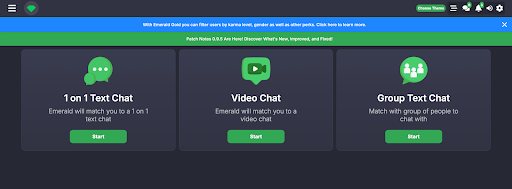
We’ve kept the process simple so you can spend less time figuring things out and more time talking.
On the Website:
Just navigating to the site’s homepage lets you start. Choose between textual content material chat, random video chat, or group chats, then click to start chatting. You can read our guide and website tips for a more detailed walkthrough.
On the Mobile App (Emerald Gold only):
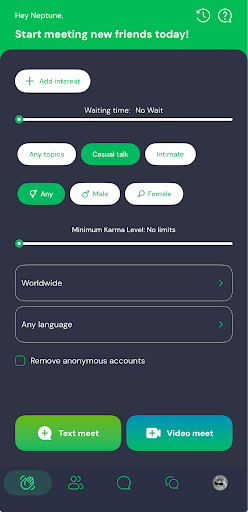
If you’re an Emerald Gold member, you’ll have access to our downloadable mobile app. Once you download the app, log in, set your preferences, and start chatting instantly. Emerald Chat offers smoother connections here, letting you chat with random people worldwide.
Every time you chat, you’re in control. You can keep it short, move on to a new chat, or stay longer in a constructive chat that feels worth your time.
Safety First – Safeguarding Update and Age Verification
We know safety is one of the biggest concerns with chat websites. That’s why we’ve put a safeguarding update and age verification system in place.
Here’s what you can expect:
- Users must be over 18. Our system checks that each user is over 18 and confirms you must be over 18 years to access.
- Protection for a young person in your care. A trusted adult should always supervise online activity.
- Reduced risks. These steps limit sexual imagery and language, age-inappropriate content, and risks of online predators.
- Education and awareness. We work with safer school partners to teach online safety both online and offline.
By combining safeguards with responsibility, Emerald Chat makes it easier to avoid dangerous chat websites and enjoy safer conversations.
Why Users Choose Emerald Chat Over Dangerous Chat Websites
Many have tried Omegle and Monkey (once a popular Omegle choice) but soon realized how unsafe those video chat sites can be. If you want to avoid Omegle, you’ll see why people switch to us.
We’re like Omegle in format, but it’s an Omegle variety that puts safety first. With Emerald talk to strangers, you can connect with strangers online while still feeling protected.
Unlike an anonymous chat website with no moderation, we designed Emerald Chat to let you use it safely while enjoying the thrill of stranger chat.
This makes us a better option if you want both fun and peace of mind.
Features That Make Emerald Chat Stand Out
We’ve added features that go beyond what other anonymous chat websites offer:
- Emerald Gold: A premium upgrade for users who want more control and perks.
- Multiple chat modes: From textual content chat to video calling, you choose how you want to connect.
- Constructive chat focus: We encourage meaningful conversations instead of random noise.
- Simple setup: You can access everything through your web browser or download the app (if you’re a gold user). Your choice.
- Community design: We built our interface to make it easy for students, professionals, and anyone craving social connections to feel comfortable.
Our goal is to create a chat service that feels modern, safe, and flexible, something more than just an Omegle alternative.
Using Emerald Chat Effectively
To get the best out of Emerald Chat, try these tips:
- Pick the right device. Use mobile for quick chats and desktop when you want the full experience.
- Try different modes. Switch between text, video, and group chats to see what feels right.
- Use preferences. Add interests or tags to connect with people who actually share your hobbies or values.
- Respect your time. If a chat doesn’t feel right, leave it and start fresh.
- Stay mindful of safety. Even though we’ve built in protections, always be cautious when you talk anonymously.
The more you tailor your experience, the more rewarding your conversations will be.
Final Thoughts
At Emerald Chat, our goal is simple: to give you a place where meeting strangers online feels both safe and worthwhile. Whether you’re on your phone or your computer, you’ll find an experience that’s easy to navigate and ready to connect you with people who might just make your day.
We’re a community designed to help you make new friends, discover similar interests, and enjoy conversations that matter. Use Emerald Chat effectively, and you’ll see how much better online chatting can be when safety, simplicity, and meaningful connections come first.
Leave a Reply